Three Ways to Tell Your Story With Power BI and CXO


Finance teams are turning to automation for fast processing and actionable insights. This shift toward stand-alone business intelligence tools is motivated by the need for rapid, informed decision-making in the competitive business landscape, enabling organizations to adapt swiftly to market changes and optimize their processes for improved outcomes. However, leveraging these insights can be challenging if your reports and data don’t speak to each other.
Disconnected Enterprise Performance Management (EPM) and operational reporting can present significant limitations for your business. It can lead to outdated and inconsistent data, hindering timely decision-making processes. Maintaining data consistency becomes difficult when information is scattered across a variety of disconnected systems, resulting in inefficiencies, errors, and a struggle to tell your organization’s story.
Many companies, in an attempt to resolve these challenges, invest in expensive, complicated, and often unsuccessful initiatives aimed at consolidating financial and non-financial data into a single source for reporting. These efforts frequently fail entirely or partially due to the inherent differences in the datasets. Consolidated financial data is metadata-driven, while transactional data is either data-driven or event-driven. These differing structures make uniform consolidation difficult and time-consuming, pushing many teams to their limits without delivering the intended results.
Our streamlined solution of embedding Power BI within CXO Reporting makes this cumbersome process obsolete. By leaving data in its natural form and location, this integration offers a seamless way to harness the power of your financial and operational narratives. Instead of battling with the complexities of data consolidation, you can focus on extracting insights and crafting a coherent story that drives smarter decision-making.
Collaboration and communication can also be hampered, as sharing and updating reports becomes cumbersome and time-consuming. The lack of real-time updates can result in missed financial opportunities and market strategies, impacting your organization’s overall efficiency and competitiveness in the market. With embedded Power BI in CXO, you not only align insights across disparate datasets but also streamline collaboration. Teams can work from consistent, reliable data sources, fostering clarity and efficiency within the decision-making process.
With these tools, organizations empower their finance teams to act quickly, adapt confidently, and present their business story with clarity and impact.
CXO Dashboards Meet Power BI to Turn Static Data Into Dynamic Insights
A recent survey by insightsoftware reported that 89% of organizations feel they are not getting high-value data insights from their EPM. This means that you likely cannot access the data you need in the way you need it.
That is why adopting a robust business intelligence solution that integrates with your EPM system could just be the solution you seek. By transforming static information into rich, dynamic report packs with integrated commentary, you can tell the true story behind your numbers.
Together, CXO and Microsoft Power BI provide you with access to insights from both EPM and BI data in one tool. You can now elevate the decision-making process by drilling down into more detailed data and enriching EPM figures with non-financial data.
Transforming Financial Reporting with Dynamic Dashboards
Download Now1. Expand Your Reporting Insights
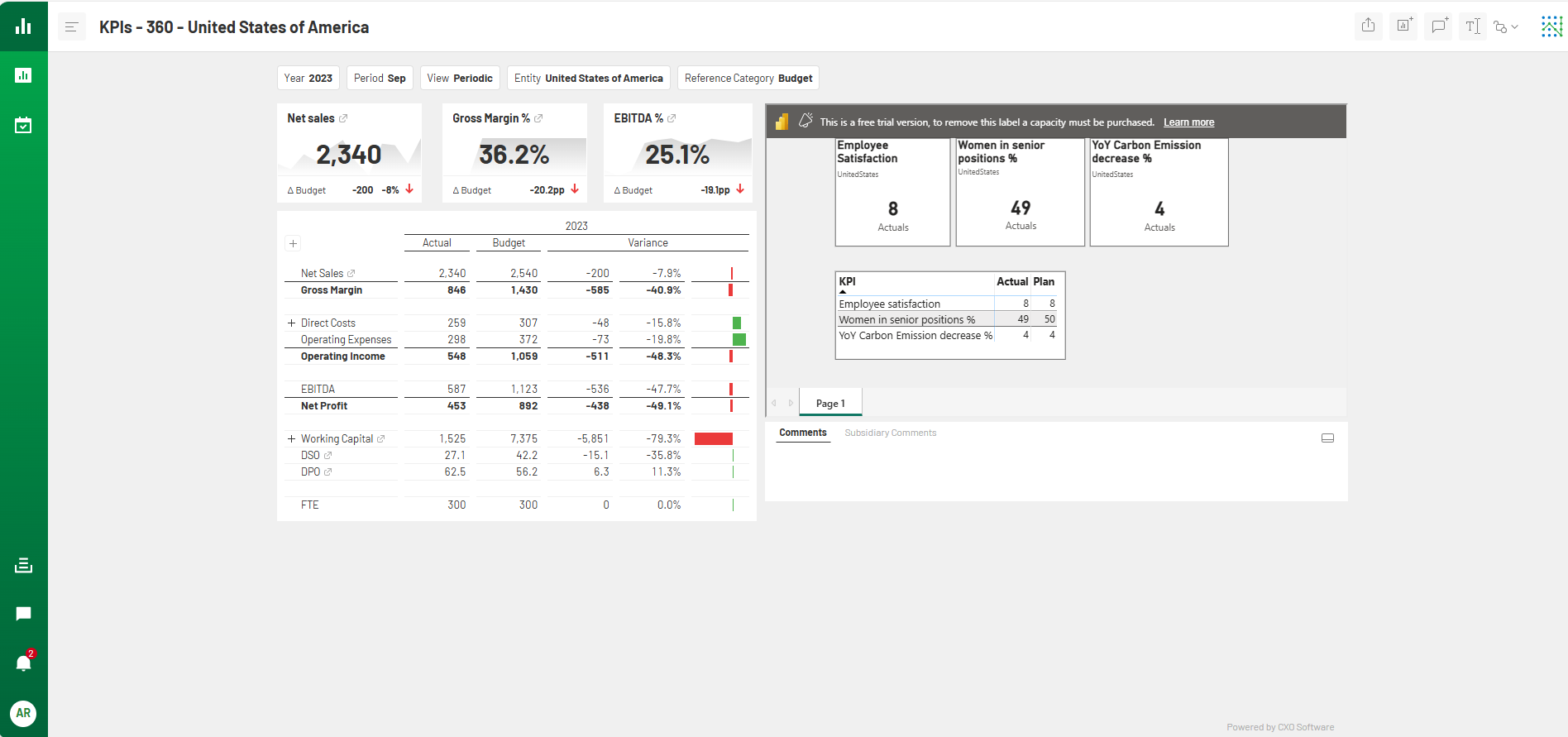
The EPM data reported through CXO are designed to provide you with aggregated insights. It can, for instance, tell from which country profit growth is coming. However, eventually, you aren’t able to drill down further if you want to dive deep into this profit growth. This is because the transactional detail necessary for such analysis is captured in different software. Power BI struggles with connecting to EPM systems and representing EPM data. However, it is designed for transactional data reporting. By embedding Power BI reports in CXO dashboards, you can have the best of both worlds. You’ll have access to insights for both strategical and tactical decision-making in the same tool.
2. Gain Richer Data Access
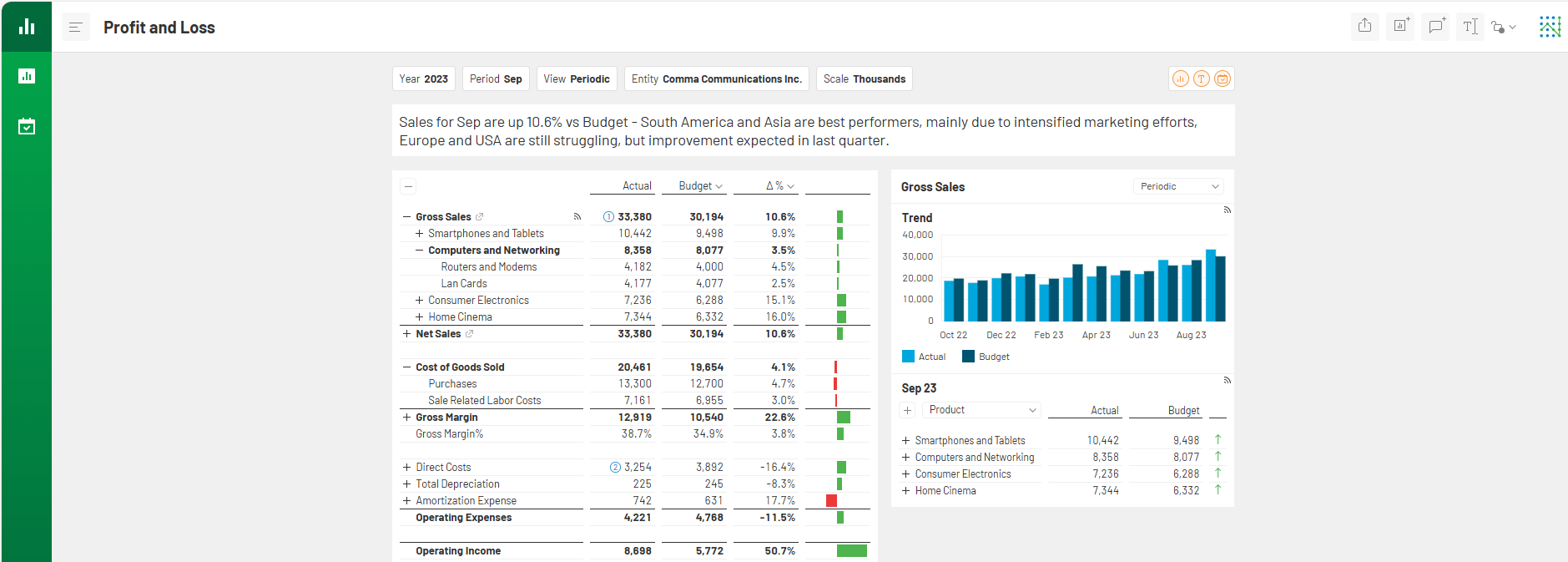
Beyond delving deeper into EPM data, you likely aim to enrich your CXO dashboards with information beyond what EPM systems provide. With the incorporation of Power BI reports, you can enhance CXO dashboards with diverse data points, such as NPS scores, ESG metrics, and project details. This integration consolidates all pertinent information within CXO, providing management with a comprehensive overview in one centralized location and eliminating the need to juggle multiple tools.
3. Benefit from Dynamic Data Interaction
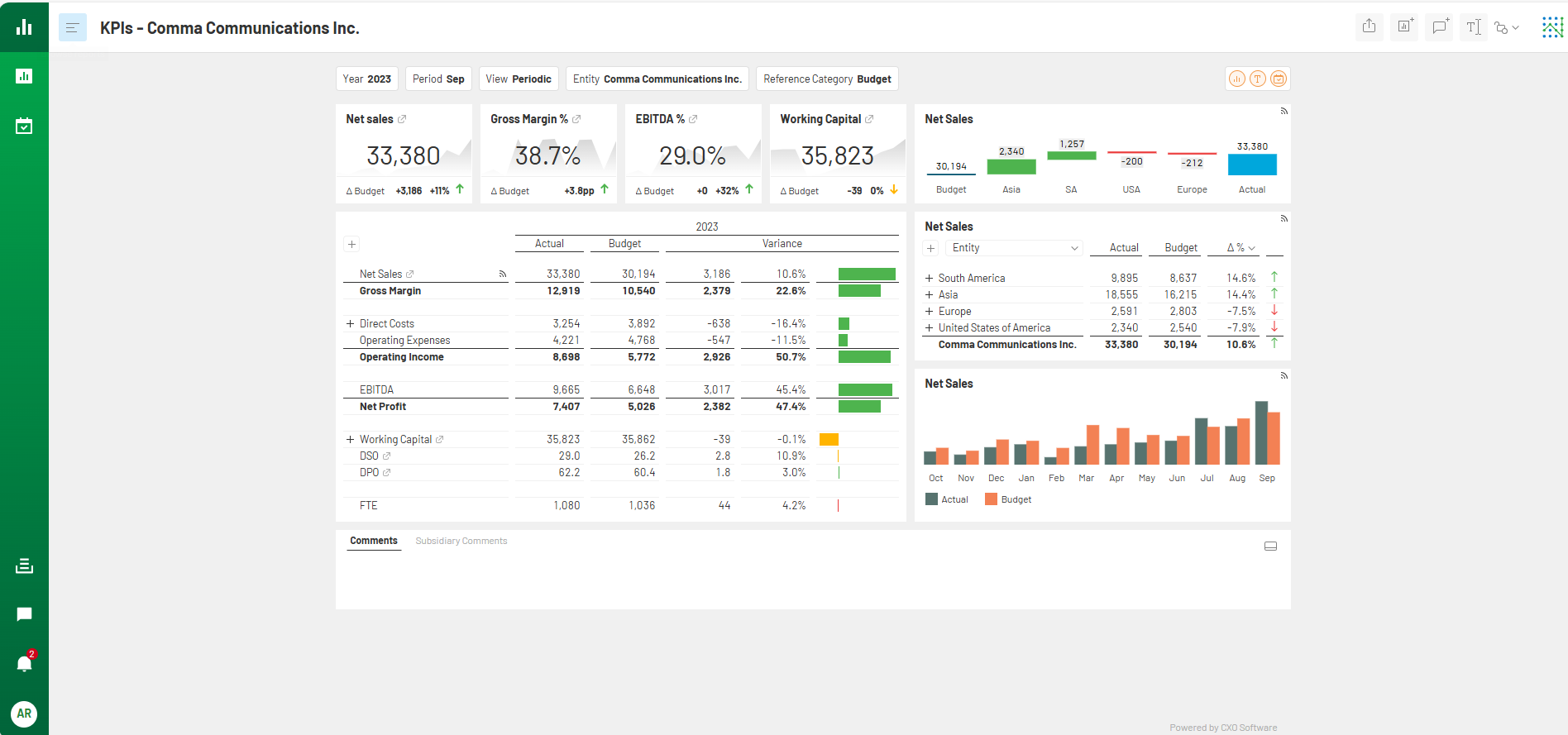
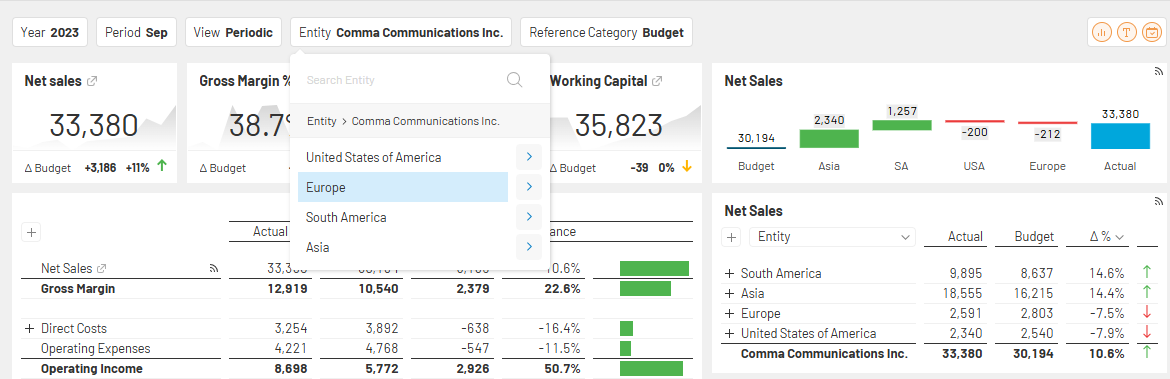
The integrated Power BI reports respond dynamically to the filtering selections made within CXO. Whether you switch from one month to the next, focus on a specific entity, or drill down into a particular product, the embedded Power BI reports seamlessly adjust to reflect these changes. This dynamic interaction allows you to uncover insights that are directly relevant to the focus of your analysis, saving time and eliminating the manual effort of reconfiguring reports.
By aligning data views with your specific needs, you gain a clearer perspective on performance trends across different time frames, business entities, or product lines. This responsive functionality ensures that your reports always provide the insights you need, enabling quicker, more informed decisions that align with your organization’s goals.
By adopting this integration, you’ll unlock real-time insights, streamline processes, improve collaboration, and adapt to the ever-changing financial landscape, ultimately contributing to your organization’s success. With CXO and Power BI, you’ll be able to see your EPM, operational, and non-financial data in the same dashboard, give your management complete information with financial and non-financial KPIs, and be able to do deep dive analyses from aggregated to transactional level. This empowers you to present your company’s financial story with greater clarity and impact.
If you would like to learn more about CXO’s interactive EPM reporting firsthand, contact us today to arrange a demo.

An Intelligent Reporting Solution With CXO
Download Now: